

From global groups to a one-van business
Every property. One platform.
SRG OPCOMS brings tasks, maintenance, purchasing, stock, daily sales and finance into one system, for a hotel group with dozens of properties or a small company working from a van. You choose the properties, departments, roles and sections, so it fits the way you work. Staff work from their phones, managers approve, and head office sees it all as it happens.
Live demo · open now
Log in to the real system and try everything. One click signs you in as the owner, a manager or staff.
demo.srg-opcoms.com · see the demo logins
€600 one time for a permanent licence that never expires, with our help to install and set it up. 30-day free trial.
Places
Head office above. Each property on its own.
One installation holds the whole group. Each property keeps its own people, departments and records, and one property never sees another. Head office switches between all properties, itself, or one property with a single filter.
Head office
Its own departments. Sees every property side by side, moves staff between them and sets who may do what.
Property Managers
Full control inside their own property: people, departments, permissions and sign-offs. Nothing outside it.
Staff
Their own tasks, reports and requests on any phone. They sign up themselves and choose their department.
What it does
Built operation by operation
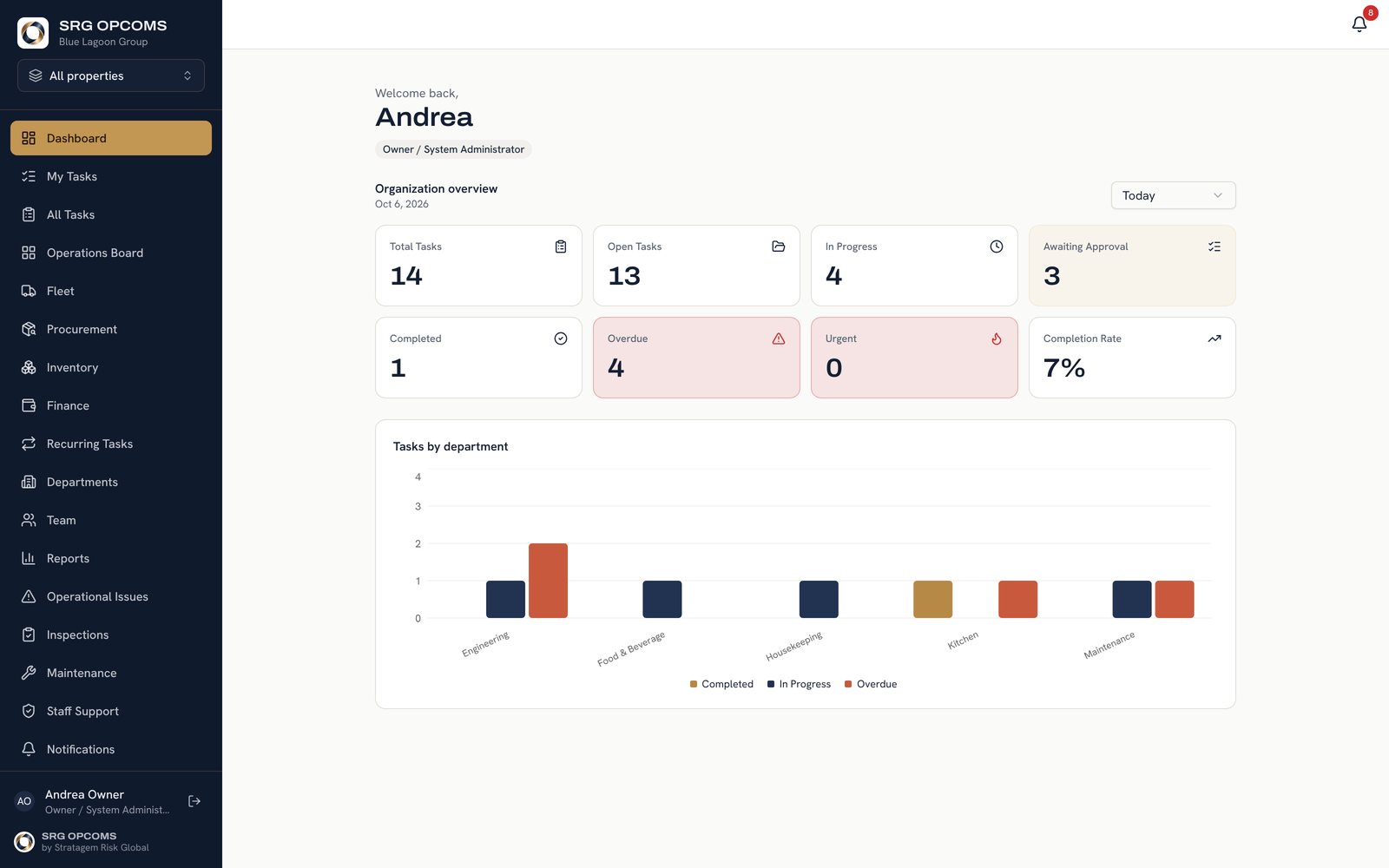
Everything a hotel or resort group runs on, from the first task of the morning to the owners' report. Each section is switched on only where it's used. Click a picture to see it full size.
Guided tour
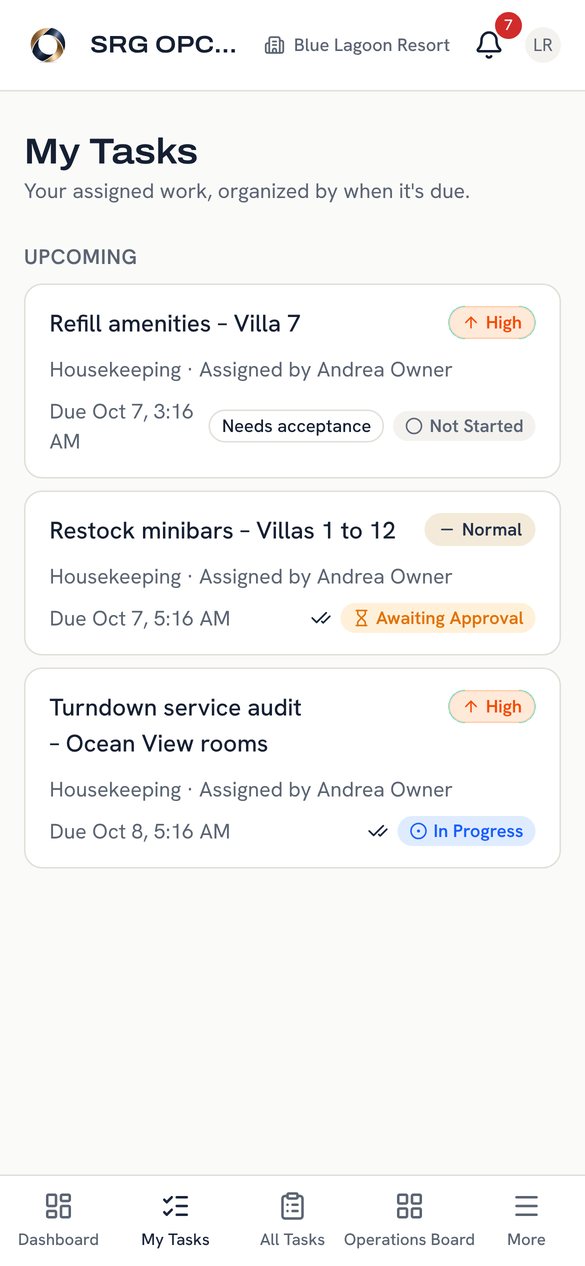
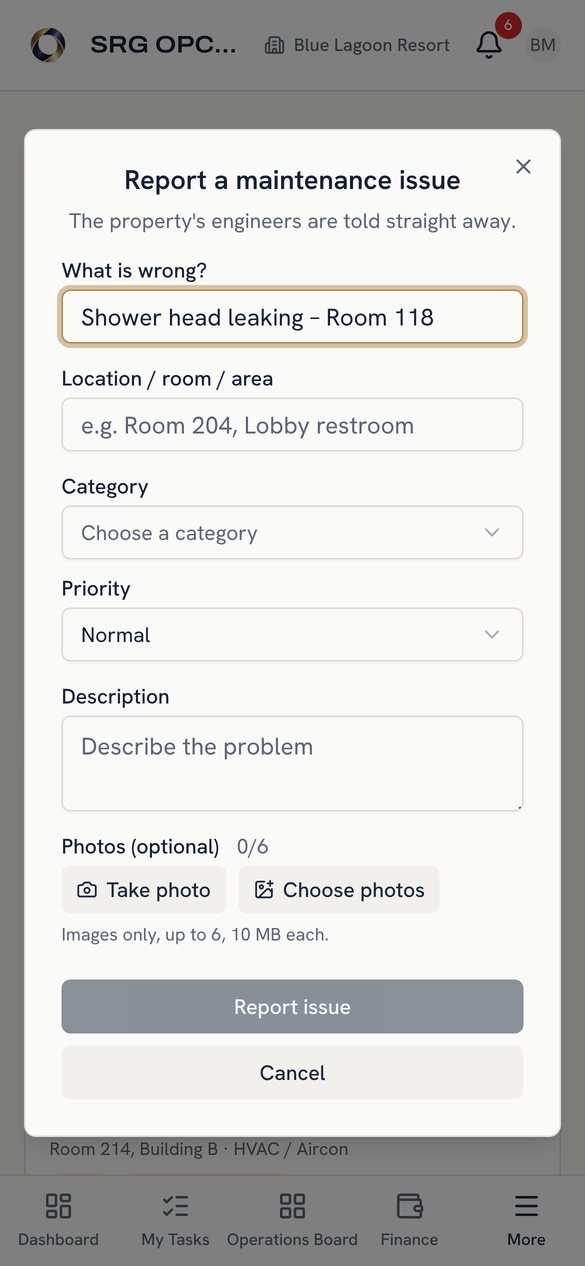
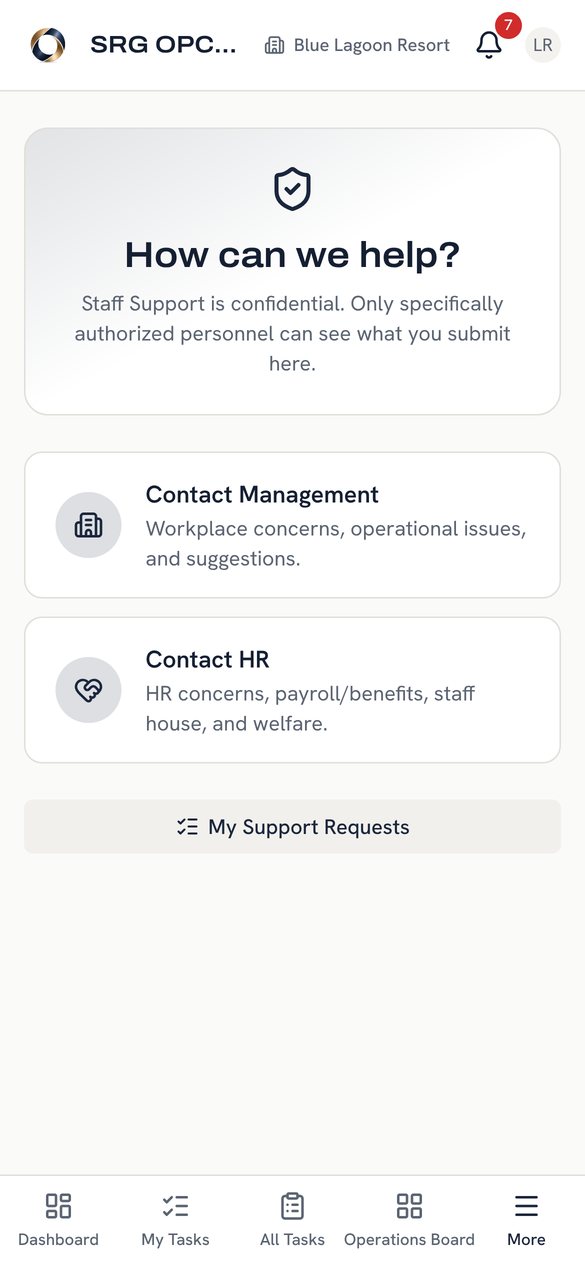
See SRG OPCOMS through three people's eyes
Real screens from the app with demo data. Each person sees SRG OPCOMS differently, depending on their job.
Demo figures are shown in Philippine pesos (₱) for a fictional group. Each company sets its own currency, time zone and date format, and each property can use its own currency.
1 Choose a person to be
2 Their screens
On every phone
No app store. No training manual.
Staff open your address once and add it to the home screen. It looks and works like an app, with your logo, and updates itself. Photos go straight from the camera into tasks, repairs and claims.
- Android and iPhone, any browser
- Desktop app for Windows, Mac and Linux
- Each person sees only their own work
Live demo
Log in and try the real thing
A full SRG OPCOMS installation with a fictional group of two resorts. Log in as anyone in the table and change anything you like. The demo resets every night.
Demo figures are shown in Philippine pesos (₱) for a fictional group. Each company sets its own currency, time zone and date format, and each property can use its own currency.
Password for every demo account: Demo2026!
| Try it as | |
|---|---|
| Owner / head office | [email protected] |
| Group finance | [email protected] |
| Property Manager, Blue Lagoon | [email protected] |
| Maintenance Manager | [email protected] |
| Engineer | [email protected] |
| Front desk staff | [email protected] |
| Property Manager, Coral Bay | [email protected] |

Protecting extraordinary places
About us
By Stratagem Risk Global
Stratagem Risk Global protects extraordinary places. SRG OPCOMS comes from that work: one platform for the people, places and operations that keep a hotel or resort group running, and the results head office needs to see.
SRG OPCOMS is owned and operated by Praetorian Security Group Ltd, registered in England & Wales. We set it up with your own properties and departments, train your managers, and stay on hand once you go live.
Your data, your choice
Runs on your server or ours
Your own server, your own address
Buy the licence and it runs on your computer or server, at your own address, for example ops.yourcompany.com. A control panel installs it in one click, then backs it up and upgrades it.
Hosted by us, if you prefer
A monthly fee and we run it for you, with daily backups and updates. You can use your own address, or one we provide such as yourcompany.srg-opcoms.com.
Kept apart and secure
Every action is checked on the server. Each client has its own database and properties stay separate.
Pricing
Pay once. Yours for good.
A permanent licence that never expires. No yearly renewal, no per-user fees, and no paying again for each section.
Own it
€600
One time · permanent licence · never expires
- Permanent licence that never expires
- We help you install and set it up
- Every section included
- Head Office plus up to 10 properties
- Unlimited users and departments
- Runs on your own server at your own address, for example ops.yourcompany.com
Your purchase grants you a licence to use SRG OPCOMS. Ownership of the software, source code, trademarks and intellectual property is not transferred. Terms & Privacy
We host it
Monthly
Hosting and subscription
- Everything in Own it
- We run the server, backups and updates
- Your own address, or yourcompany.srg-opcoms.com
- No IT work on your side
More than 10 properties
Let's talk
A price for your group
- A plan shaped around your group
- Help moving properties in
- Training for managers
After you buy
How you get SRG OPCOMS
From order to your team using it, usually within a week.
- Order and accept the terms
Fill in the order form below and agree to the Terms, Software Licence & Privacy Policy. You get an order number by email straight away.
- Invoice and payment
We send the invoice within one working day. Your licence becomes active once payment is received.
- Installation
We send a private download link and help you install it on your own server, at your own address. If we host it, we set it up for you instead.
- Set-up, licence and go live
You send us your installation ID and we activate your licence. We set up your properties and departments and train your managers.
How your staff join
Your team is connected in a minute
Every company has its own SRG OPCOMS address. If you buy the licence, it is on your own domain. Staff open it on their phone, sign up, and it sits on their home screen like any other app, with your logo. Nothing to download from an app store.
- Share your address
Your system has its own web address:
- You bought the licenceYour own domain
ops.yourcompany.com - We host it for youYour domain, or one we give you
yourcompany.srg-opcoms.com
Send it to staff, or put up a QR code in the staff room.
- You bought the licenceYour own domain
- Staff create their account
They open the address and tap Create account, or a manager creates it for them. You can switch self sign-up off if you prefer.
- The manager sets their role
New people start as Staff. Their manager sets the department, position and role on the Team page.
- Add it to the home screen
It then opens full screen like a normal app, with your logo, and updates itself.
Buy now
Order SRG OPCOMS
Tell us who you are and which package you want. We'll confirm by email and send the invoice within one working day.
- No payment is taken on this page
- Your licence is activated once the invoice is paid
- Questions first? WhatsApp or Viber +63 952 446 9348
Questions
Frequently asked
Is €600 really a one-time fee?
Yes. It buys a permanent licence that never expires, for the full product with every section, Head Office plus up to 10 properties. There's no yearly renewal. You only pay monthly if we host it for you.
Do you help with installation and setup?
Yes. Installation and setup support is included. We help you install SRG OPCOMS on your server, set up your properties, departments and roles, add your logo, and train your managers so you can go live. After that, ongoing support is available if you want it.
Does the licence ever expire?
No. Your licence is permanent and keeps working on your installation for as long as you use it. Installation and setup help is included. Optional extras, such as hosting, ongoing support plans, future major versions or custom work, are priced separately if you want them.
Can one property see another's information?
No. Each property only sees its own people and records. Head office sees all of them and filters by property and department.
Do staff need to install anything?
No. They open your company's address on their phone, sign up and add it to the home screen (see How your staff join). Offices can also use the desktop app.
Will our system use your web address?
No, not if you buy the licence. It runs on your own server at your own address, for example ops.yourcompany.com, with your name and logo. Only if we host it for you can you choose an address we provide, such as yourcompany.srg-opcoms.com, and you can still use your own domain instead.
Where is our data stored?
On your own computer or server, or on ours if we host it. Each client has its own installation and database.
Is it only for hotels?
No. It's fully customisable, from a large corporation with many sites down to a small company working from a van. You name your own properties or locations, departments and roles, switch on only the sections you need, and add your own logo and colours. Hotels and resorts are simply where it started.
How do we get the app after buying?
After your order we send the invoice. Once it's paid, we send you a private download link for the server package and help you install it on your own computer or server, or we set up a hosted installation for you. You send us your installation ID and we activate your licence. Staff then open your own address on their phones.
Do we own the software?
No. You buy a licence to use SRG OPCOMS. Your data stays yours, but the software, source code and brand remain with Stratagem Risk Global. See the Terms & Conditions.
Can we try it first?
Yes. Use the interactive demo above, log in to the live demo, or start a 30-day free trial on your own installation.
Get in touch
See your own group in SRG OPCOMS
We'll set up a demo with your properties and departments, so head office sees its own structure on screen.
- [email protected]
- Phone · Viber · WhatsApp
- +63 952 446 9348
- Contact
- Andrew, Stratagem Risk Global